Pretty Progress vs Countdown X: Progress Rings or Dot Grids for Your Dates?
Pretty Progress turns your dates into rings and bars on every Apple device. Countdown X turns them into dot grids on iPhone and iPad. Here's how the two compare on price, free features, sync and design.
Some countdown apps tell you how many days are left. Pretty Progress and Countdown X both go a step further and show how much of the wait is already behind you. Pretty Progress, made by keinois OÜ, draws that as rings and bars. Countdown X draws it as a grid of dots that light up one by one.
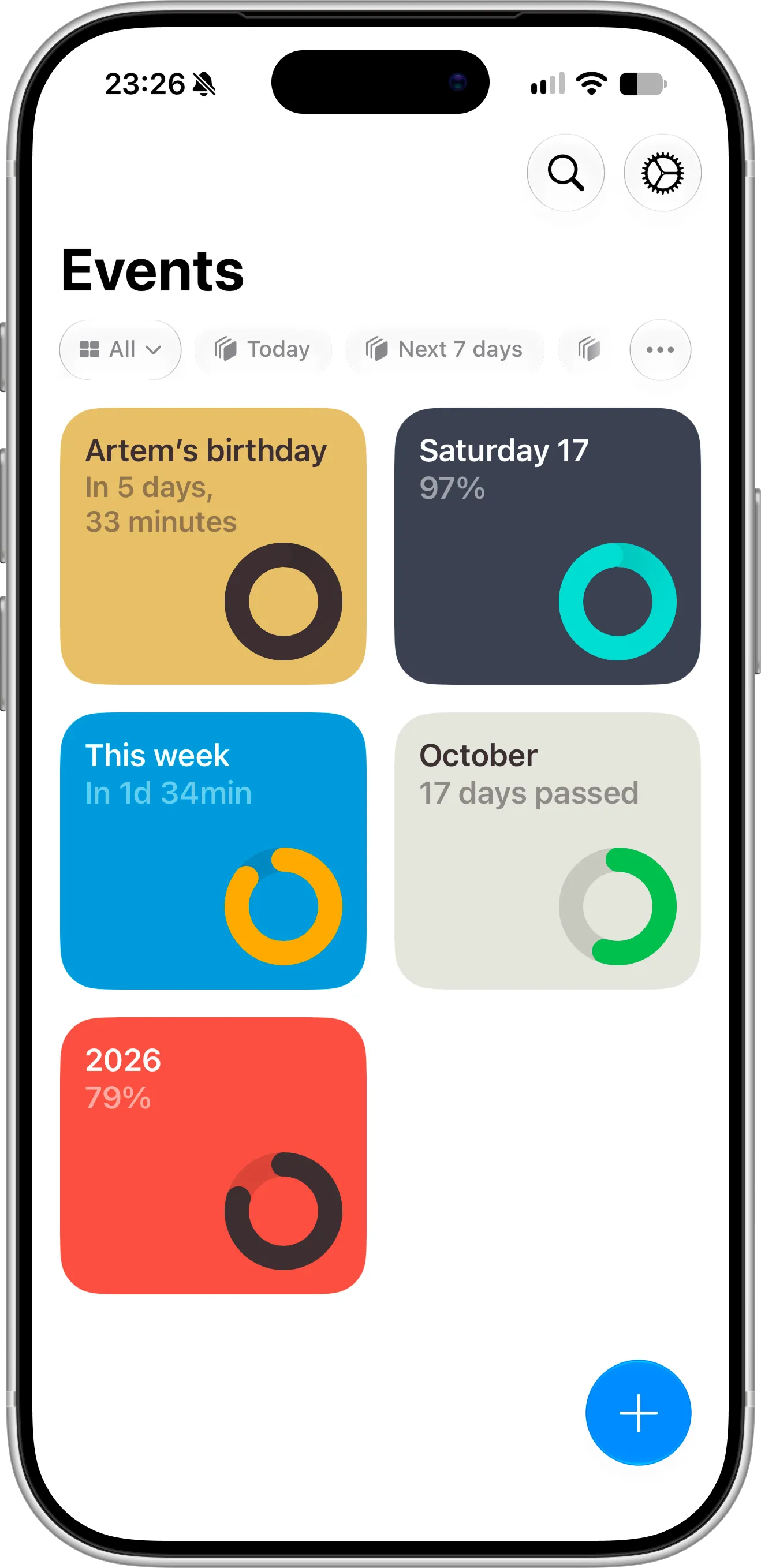
Pretty Progress’s Events screen: every event is a colored card with a progress ring, showing either the time left, the time passed or a percentage — here a birthday in 5 days, October with 17 days passed and 2026 at 79%. Filters at the top narrow the list to today or the next 7 days. Screenshot taken in October 2026.
We make Countdown X, so read this with that in mind. Everything below about Pretty Progress comes from its App Store page, its own FAQ and our own time using the app in October 2026, and there’s a whole section on what it does better than us.
Two Different Ideas of a Countdown App
First, the common ground: both are well-designed apps. Neither looks like a quick weekend project, and both take their Home Screen and Lock Screen widgets seriously, with clean layouts, careful typography and progress you can read at a glance. Whichever one you pick, your widgets will look good next to Apple’s own.
Both also fit well into the rest of Apple’s ecosystem rather than living in a bubble. Each works with Apple Calendar and Reminders, syncs through your own iCloud account (with PRO in Pretty Progress) and puts countdowns on the Home Screen and Lock Screen. Pretty Progress adds Shortcuts actions, StandBy, Apple Watch and Mac widgets, while Countdown X makes every countdown searchable in Spotlight. Where they differ is in what they’re trying to be.
Pretty Progress wants your countdowns everywhere and lets you style each one. It runs on iPhone, iPad, Apple Watch and Apple silicon Macs, and also has an Android app. On the Home Screen you choose between widget templates such as Swiss Style, The Grid, Aqua, Retro OS and Minimal, then adjust colors, icons, fonts, bar shapes and layout. With more than 3,000 ratings and a 4.7-star average in the US, it has a loyal following.
Countdown X keeps to iPhone and iPad and keeps the setup short. You name the date, pick a color or a style template, and decide whether to see the time left or a percentage. The app looks and behaves like Apple’s built-in apps, and the dot grid is the same on every countdown, so your Home Screen stays consistent without any tuning.
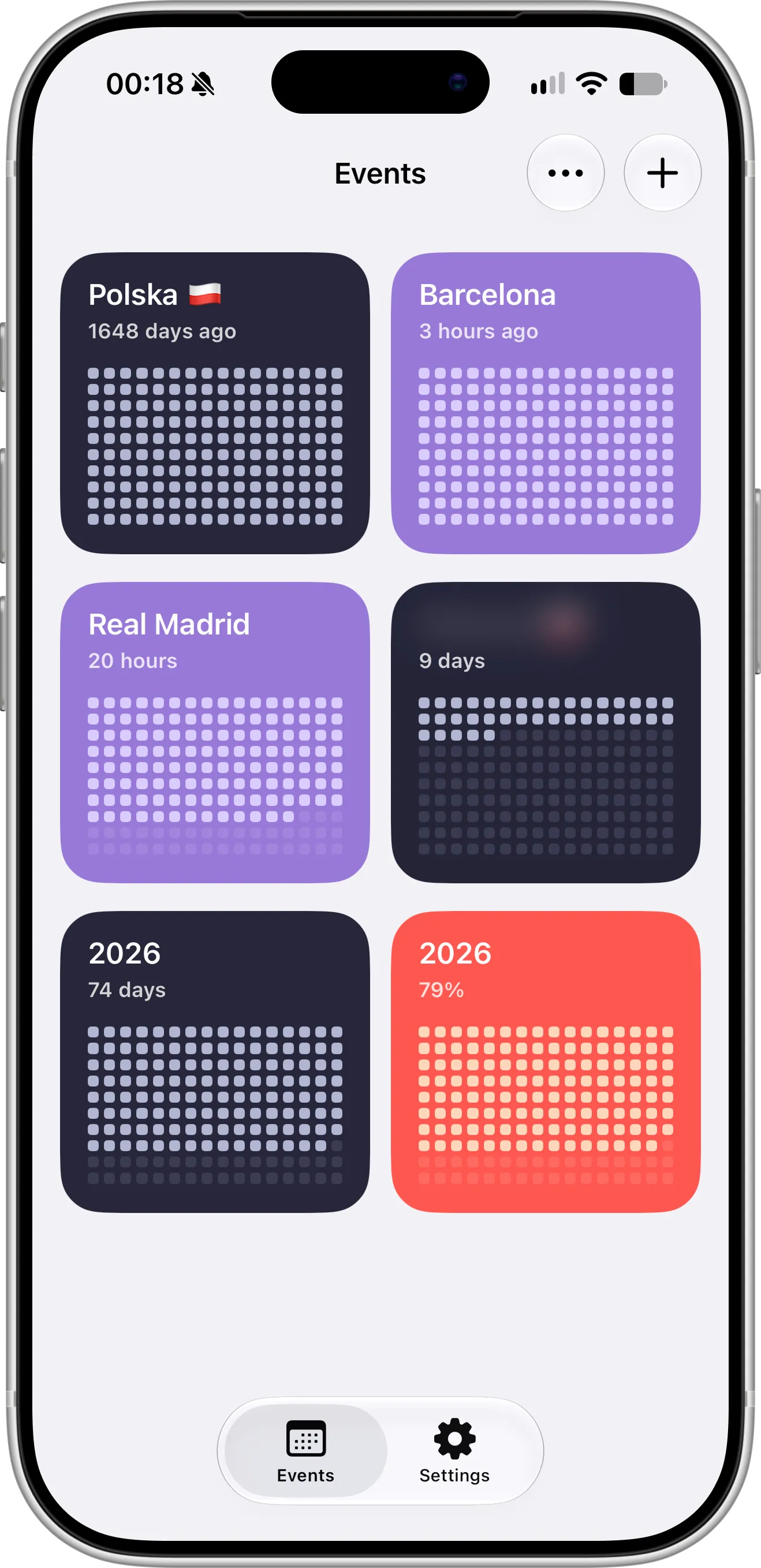
The Events screen in Countdown X: every event is a dot grid in its own color, whether it was 1,648 days ago or is 20 hours away. One title is blurred to keep it private, and 2026 appears twice, as 74 days left and as 79% complete.
Side by Side
| Pretty Progress | Countdown X | |
|---|---|---|
| Runs on | iPhone, iPad, Apple Watch, Mac; separate Android app | iPhone and iPad |
| How progress looks | Rings, bars and other templates | Dot grid, or a percentage |
| Free plan | Four custom countdowns, two designs, plus built-in day, week, month and year progress | One event, every widget size, iCloud sync |
| Upgrade (US) | PRO: $4.99/week, $24.99/year, $49.99 Lifetime | Premium: $2.99/month, $14.99/year, $29.99 Lifetime |
| iCloud sync | With PRO | Free |
| Widget templates | Several, most with PRO | Colors and style templates |
| Lock Screen widgets | Yes | Yes: circular, rectangular, inline |
| Time since an event | Yes | Yes |
| Percentage with a start date | Yes, free | Yes (Premium) |
| Repeating events | Yes | Daily to yearly, plus every two weeks (Premium) |
| Notifications | A week before, a day before and at the end, free | Per event, on or off (Premium) |
| Calendar and Reminders | Ongoing sync (PRO) | Import (Premium) |
| Automation | 21 Shortcuts actions, free | Spotlight search for every countdown |
| Blur event titles | No | Yes (Premium) |
Features and prices change, so check each App Store page before you decide.
Which One Fits You
You wear an Apple Watch or work on a Mac
Go with Pretty Progress. Its countdowns appear as watch complications, in the Smart Stack, in StandBy and on the Mac desktop and Notification Center. Countdown X doesn’t have Apple Watch or Mac apps.
You want your iPhone and iPad in sync without paying
Countdown X backs up and syncs every countdown through your iCloud account for free. Pretty Progress also syncs through iCloud, but its FAQ lists sync as a PRO feature, so on the free plan each device keeps its own countdowns. Neither app asks you to create an account.
You like to design your widgets
Pretty Progress gives you far more to adjust: gradient fades in Aqua, item shape and size in The Grid, bar thickness in Minimal, old desktop windows in Retro OS, and time shown in any mix of years, months, weeks and days. Countdown X deliberately offers less, so if tweaking widgets is half the fun for you, Pretty Progress will feel richer.
You want the dots without unlocking anything
Pretty Progress has a dot-style template called The Grid, but it’s part of PRO. In Countdown X, the dot grid is how every countdown looks, in every widget size, on the free plan.
You’d rather pay less over time
A year of Countdown X Premium costs $14.99, $10 less than Pretty Progress PRO’s $24.99. The one-time Lifetime unlock is $29.99, $20 less than Pretty Progress’s $49.99. If you’d rather not commit to a year, the gap is wider: Pretty Progress’s shortest plan is $4.99 per week, while Countdown X Premium is $2.99 per month. Pretty Progress’s single purchase does cover all of its platforms, including Apple Watch and Mac, and works with Family Sharing, which matters if you’d use those extra devices.
You don’t want a sales pitch every time you open the app
This is where our hands-on time with the two apps felt most different. More on it below.
You track lots of dates for free
Pretty Progress is more generous here: four custom countdowns on the free plan, against one event in Countdown X, and its free version already includes notifications, percentages, counting up and Shortcuts. If you never plan to pay, that’s a real difference. Countdown X Premium removes the limit and adds reminders, repeats, percentages and Calendar and Reminders import.
What Opening the App Feels Like
Feature lists don’t show this part, so here’s what we saw when we installed Pretty Progress on an iPhone and used it for a while in October 2026.
The paywall came up every time we opened the app, not just on the first launch. Its close button didn’t appear right away: we had to wait a few seconds before we could dismiss it. And closing it didn’t always take us straight to our countdowns. Instead, the app often followed up with another promotional offer before letting us in.
None of that stops the free version from working, and you may decide the app is worth upgrading for anyway. But if you open a countdown app several times a day just to check a date, waiting out an upgrade screen each time adds up quickly. App Store reviews and pricing pages won’t tell you this, so it’s worth trying the free version for a few days before you commit.
Countdown X takes a quieter approach. The free version opens straight to your events, every time. Premium is there when you go looking for it, or when you try something that needs it, like adding a second event or turning on a reminder, and you can always close it right away.
Counting Up, Counting Down and Everything Between
Both apps go beyond a plain “days until” number. Each can count up from a past date, so you can follow how long ago you quit a habit or started a job, and each can show a percentage between a start and an end date.
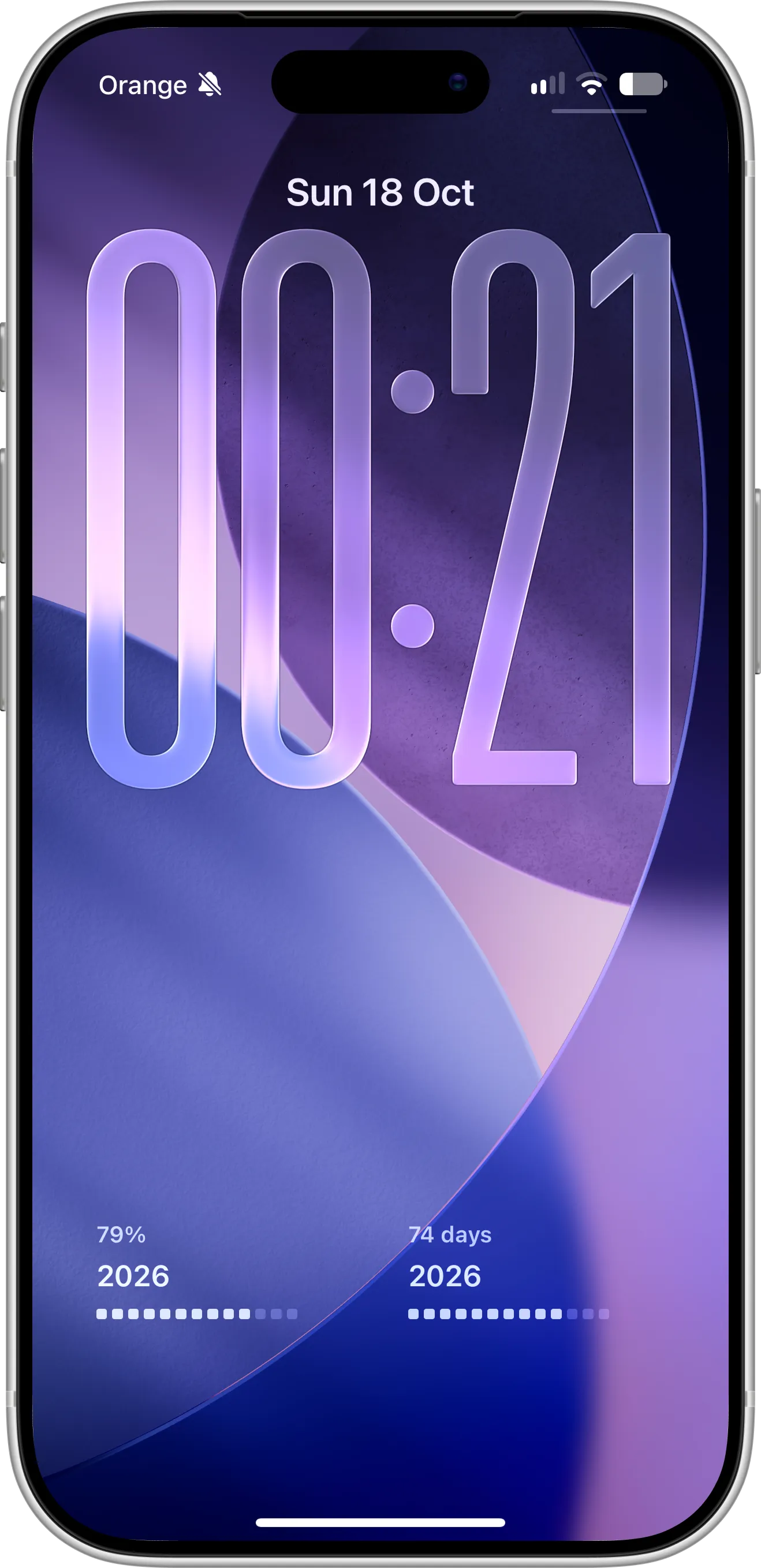
Two rectangular Countdown X widgets under the Lock Screen clock, tracking the same year in two ways: 2026 is 79% complete on the left and has 74 days left on the right.
In Countdown X, the percentage view is a good fit for a semester, a notice period, a pregnancy or the year itself. Pretty Progress comes with day, week, month and year progress ready to go, and its percentages are free, which is handy if you like to watch the week slip by.
Getting Your Dates In
With PRO, Pretty Progress connects to Apple Calendar and Reminders and keeps those countdowns in step with your plans. It also offers 21 Shortcuts actions, free for everyone, so you can create or update events from your own automations. Google Calendar works if you first add the account to Apple’s Calendar app.
Countdown X Premium imports events from Calendar and tasks from Reminders, so birthdays, flights and deadlines you’ve already saved become countdowns in a few taps. Once they’re in, every countdown shows up in Spotlight: swipe down on the Home Screen, type its name and you’re there.
Keeping Dates Private
Both apps’ App Store privacy labels list only data that isn’t linked to you, and neither asks you to sign up. The difference is on screen: Countdown X Premium can blur event titles, so a job interview or a surprise trip doesn’t appear in plain text on your Lock Screen. Pretty Progress has no way to hide event names, so whatever you call a countdown is what anyone glancing at your widgets will see.
Where Pretty Progress Is Ahead
To be fair to it, Pretty Progress is the better pick if any of these matter most to you:
- Apple Watch, Mac and StandBy. Your countdowns follow you to your wrist, your desk and your nightstand.
- Customization. Several templates with their own settings, and full control over time units and rounding.
- More on the free plan. Four custom countdowns, with notifications, percentages and counting up, before you pay anything.
- Automation. 21 Shortcuts actions, free for everyone.
- Android. A separate Android app is available, though events don’t sync between Android and Apple devices.
Trying Countdown X Alongside It
Both apps are free, so you can run them side by side. Install Countdown X, recreate one countdown you check every day and add it to your Home Screen or Lock Screen. After a week, keep whichever one you actually glance at. For birthdays and anniversaries, our birthday countdown widget guide shows how to set a yearly repeat.
Questions People Ask
How much does Pretty Progress cost?
It’s free to download. Pretty Progress PRO costs $4.99 per week, $24.99 per year or $49.99 as a one-time Lifetime purchase in the US, and it covers iPhone, iPad, Apple Watch and Mac.
What’s the difference between Pretty Progress and Countdown X?
Pretty Progress shows progress as rings, bars and other templates across every Apple device, with lots of styling options. Countdown X shows progress as a dot grid on iPhone and iPad, follows Apple’s design closely, includes free iCloud sync and costs less to upgrade.
Is Pretty Progress’s iCloud sync free?
No. Pretty Progress’s FAQ lists iCloud sync between Apple devices as a PRO feature. In Countdown X, iCloud backup and sync are free.
Which app has a better free plan?
It depends on what you need. Pretty Progress allows four custom countdowns for free, with notifications, percentages and Shortcuts included. Countdown X allows one event, but includes every widget size, the dot grid and iCloud sync for free.
Does Pretty Progress show a paywall every time?
In our testing in October 2026, yes. An upgrade screen appeared each time we opened the app, could only be closed after a short wait, and was often followed by another offer. Countdown X’s free version opens straight to your countdowns.
Can I use Countdown X on Apple Watch?
No. Countdown X is available for iPhone and iPad only.
Can I move my events from Pretty Progress to Countdown X?
Not directly. If your dates are saved in Apple Calendar or Reminders, Countdown X Premium can import them; otherwise, you add them by hand.
If you want countdowns on every Apple device and enjoy designing them, Pretty Progress is hard to beat. If iPhone and iPad are enough, and you’d like free sync, free dot-grid widgets, a lower price and an app that doesn’t greet you with a paywall, give Countdown X a try.