Looking for a Countdown Buddy Alternative? An Honest Comparison With Countdown X
Countdown Buddy is one of the most popular countdown apps on iPhone. Here is an honest look at how Countdown X compares — where it does more, where Countdown Buddy is still the better pick, and which one fits you.

Countdown Buddy is one of the best-known countdown widget apps on the App Store. It has been around since 2020, has tens of thousands of ratings, and makes it easy to design a colorful countdown widget with your own photo in a few seconds. If you are reading this, though, something about it probably doesn’t fit you anymore — maybe you want your countdowns on your iPad too, a reminder when an event arrives, or you simply want to see what else is out there.
Countdown X is a countdown app with widgets for iPhone and iPad, built around keeping all of your important dates — and how close they are — visible at a glance. We make Countdown X, so we are obviously not neutral — but we will try to be fair. Below is a side-by-side comparison, including the cases where Countdown Buddy is still the better choice.
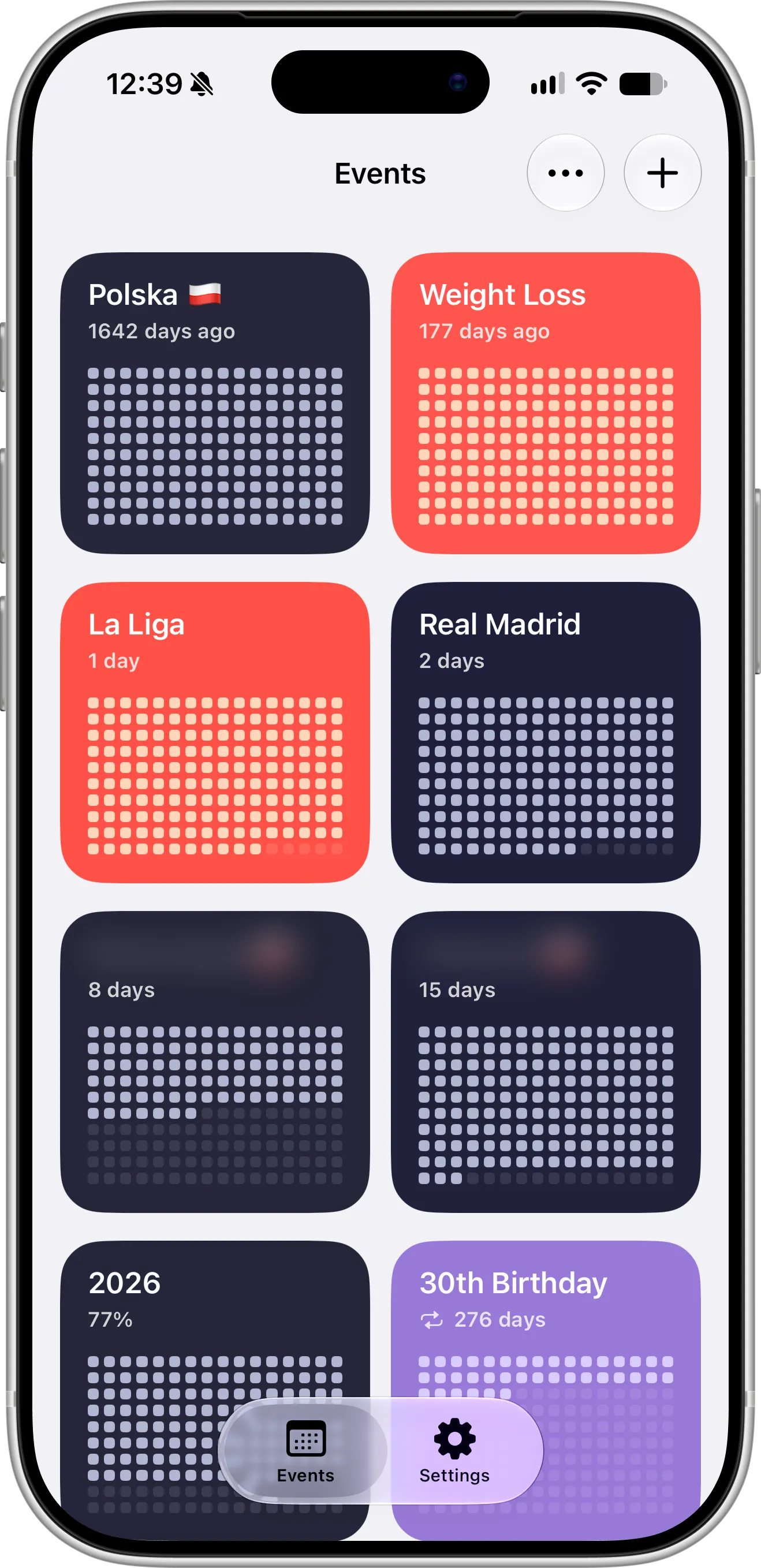
Countdown Buddy vs Countdown X at a Glance
Information below is based on each app’s App Store listing and release notes as of October 2026. Both apps update regularly, so check the App Store for the latest details.
| Countdown Buddy | Countdown X | |
|---|---|---|
| Platforms | iPhone, Apple Watch | iPhone, iPad |
| App design | Custom, playful style | Native iOS 27 design, like Apple’s Calendar app |
| Free to download | Yes | Yes |
| Free version | One countdown widget with the basic design | One event, with Home Screen and Lock Screen widgets |
| Paid upgrade (US) | Countdown+, one-time $3.59 | Premium: $2.99/month, $14.99/year or $29.99 Lifetime |
| Countdown and count-up | Yes | Yes |
| Home Screen widgets | Yes, small and medium (free) | Yes, small and medium (free) |
| Lock Screen widgets | Yes (free) | Yes, circular, rectangular and inline (free) |
| Progress visualization | Event name and time left | Pixel grid that fills up as the date gets closer |
| Widget design | 11 styles, background colors, photos and fonts (one style free, the rest with Countdown+) | Colors and ready-made style templates |
| Custom start date | Yes | Yes |
| Progress as a percentage | No | Yes (Premium) |
| Repeating events | Yes, including every X days or weeks | Daily, weekly, every two weeks, monthly or yearly (Premium) |
| Exclude weekends | Yes | No |
| Event reminders | One global setting to get notified when a countdown ends | Turned on or off for each event, sent at the time of the event (Premium) |
| Import from Calendar and Reminders | No | Yes (Premium) |
| iCloud backup | Yes | Yes (Premium) |
| Sync between iPhone and iPad | No iPad app | Yes, via iCloud (Premium) |
| Share countdowns | Share a link to the countdown | Share as an image to Photos, Messages, Instagram and more |
| Hide event titles | No | Yes, blurred titles (Premium) |
Where Countdown X Goes Further
A native iOS 27 design that feels like part of your iPhone
Countdown Buddy has its own playful, custom look built around colorful widget styles. Countdown X takes the opposite approach: it is designed to look and feel like Apple’s own apps. Its interface follows the native iOS 27 design, so navigation, lists, buttons, gestures and dark mode behave just like they do in the built-in iOS Calendar app.
The result is an app that feels instantly familiar — there is nothing new to learn, and your countdowns sit naturally next to your calendar and reminders. Countdown X was fully updated for iOS 27 shortly after its release, with smoother animations and faster performance on both iPhone and iPad.
Your countdowns on iPhone and iPad, synced with iCloud
Both apps can back up your countdowns to iCloud. The difference is where you can use them: Countdown Buddy is available for iPhone and Apple Watch, with no iPad app. Countdown X runs on both iPhone and iPad, and Countdown X Premium keeps your countdowns in sync between them through your own iCloud account. Create an event once on your iPhone and it appears on your iPad, with no separate account to sign up for.
Reminders, so the countdown doesn’t end unnoticed
A widget is great when you look at it, but it can’t tap you on the shoulder. Countdown Buddy has a single global setting that sends a notification whenever any countdown ends. Countdown X lets you configure reminders individually for each event, so you get a notification the moment a birthday, a deadline or a trip arrives — and only for the events that actually need one.
Bring your dates in from Calendar and Reminders
If your important dates already live in the iOS Calendar or Reminders app, you don’t have to type them in again. Countdown Buddy has no way to import them, while Countdown X Premium can import events from Calendar and tasks from Reminders and turn them into countdowns in a few taps.
See your progress, not just the days left
Both apps offer free Home Screen and Lock Screen widgets, but they show your countdown very differently. A Countdown Buddy widget displays the event name and the time left. A Countdown X widget adds a pixel grid that fills up as the date gets closer, so you can see at a glance how much of the wait is already behind you — without reading a single number.
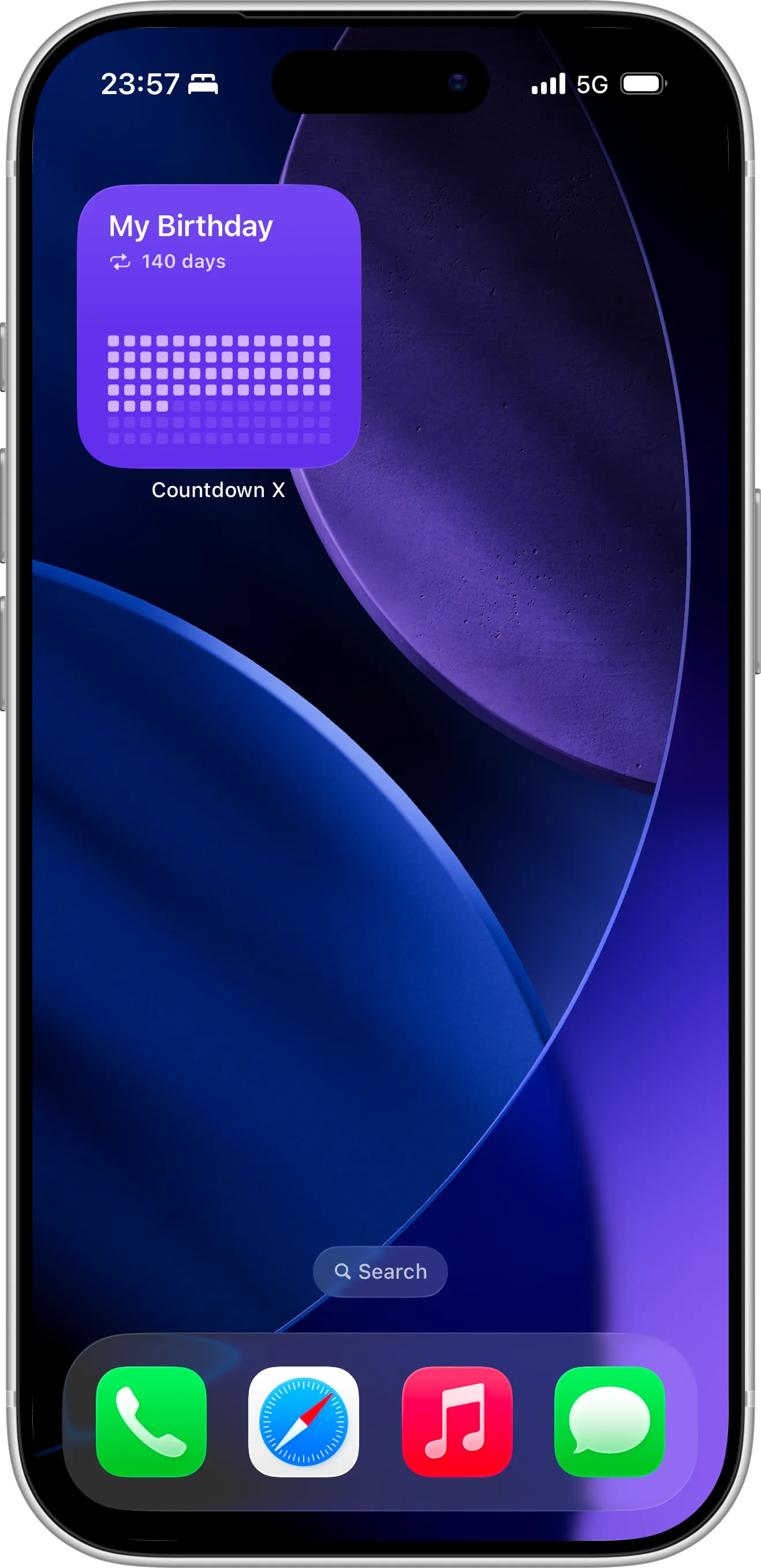
Each Countdown X event can also show its progress as a percentage instead of the time left, and you can set a custom start date to calculate it from. It’s a simple way to see how far through a semester, a pregnancy, a savings goal or the year you are. Our guide on creating a year progress countdown on iPhone shows how to set one up.
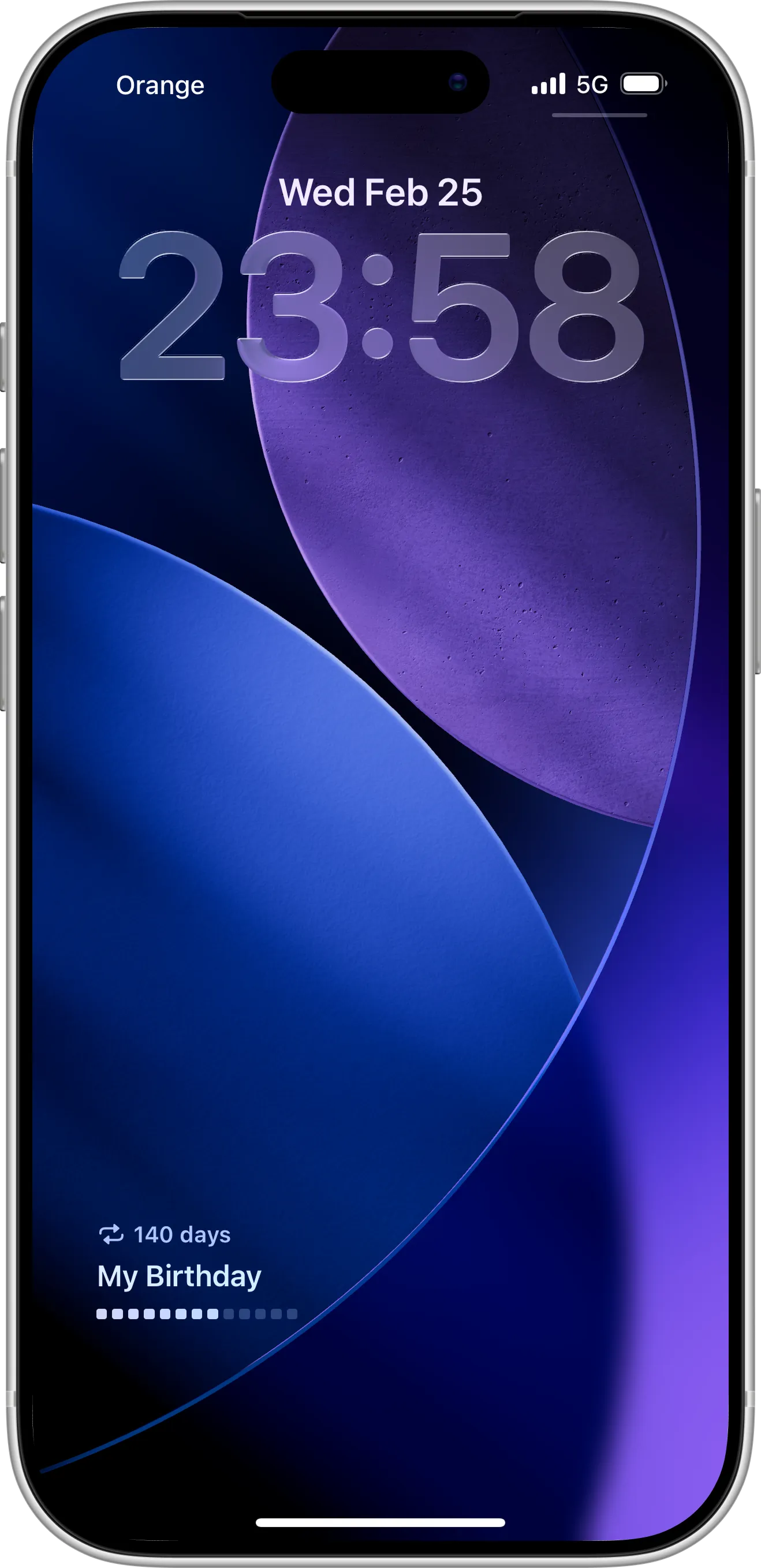
The same progress view works on the Lock Screen, with circular, rectangular and inline widgets, so you can follow your countdown every time you pick up your phone.
Privacy options and easy sharing
Countdown X Premium can blur event titles — something Countdown Buddy doesn’t offer — so a surprise party or a job interview doesn’t show up for everyone looking at your screen. And when you do want people to know what you are counting down to, you can share any countdown as an image — save it to Photos or post it straight to Messages, Instagram, TikTok or X.
Where Countdown Buddy Is Still the Better Choice
An honest comparison has to include this part. Countdown Buddy may suit you better if:
- You want your countdowns on Apple Watch. Countdown Buddy has an Apple Watch app. Countdown X is iPhone and iPad only.
- Widget design is what matters most. With the Countdown+ upgrade, Countdown Buddy offers 11 widget styles, a curated selection of fonts and your own photos as backgrounds (the free version includes one basic style). Countdown X offers colors and style templates, but no photo backgrounds.
- You want a one-time purchase at the lowest price. Countdown+ is a single $3.59 in-app purchase on the US App Store. Countdown X Premium is $2.99 per month, $14.99 per year or $29.99 as a one-time Lifetime purchase. Prices vary by region, so compare both on the App Store.
- You count working days. Countdown Buddy can exclude weekends from a countdown, which is handy for work deadlines. Countdown X counts calendar days.
- You need a custom repeat interval or a daily routine timer. Countdown Buddy can repeat events every X days or weeks (Countdown X offers daily, weekly, every two weeks, monthly and yearly) and supports a daily overnight countdown, for routines like intermittent fasting.
- You want to share a countdown as a link. Countdown Buddy lets you share a countdown with a link. Countdown X shares countdowns as images instead.
Which Countdown App Should You Choose?
Stay with Countdown Buddy if you mainly want one beautiful photo widget, you use an Apple Watch, or you count working days and want the cheapest one-time unlock.
Try Countdown X if you want a clean, native iOS 27 app that feels like Apple’s own Calendar, and you track several important dates and want them on your iPhone and iPad, synced through iCloud, with a reminder when each event arrives, and widgets that show your progress as a pixel grid or a percentage, not just the time left.
Because both apps are free to download, the easiest way to decide is to try Countdown X for a week alongside Countdown Buddy and keep the one you actually look at.
How to Switch From Countdown Buddy to Countdown X
There is no direct importer between the two apps, but moving over takes only a few minutes:
- Install Countdown X from the App Store.
- Recreate your events — or, if they are already in your calendar, import them from Calendar or Reminders with Premium.
- Turn on yearly repeat for birthdays and anniversaries, and choose a color or style template for each event.
- Add a Home Screen widget and a Lock Screen widget to keep your countdowns visible.
- Set reminders for the events you don’t want to miss.
For a full example, see our guide on creating a birthday countdown widget on iPhone.
FAQ
Is there a free alternative to Countdown Buddy?
Yes. Countdown X is free to download on the App Store and includes one event with Home Screen and Lock Screen widgets. An optional Premium upgrade — $2.99 per month, $14.99 per year or a one-time $29.99 Lifetime purchase in the US — unlocks unlimited events, reminders, repeating events, Calendar and Reminders import and iCloud sync.
Does Countdown Buddy work on iPad?
Countdown Buddy’s App Store listing names iPhone and Apple Watch as its platforms. Countdown X is available on both iPhone and iPad and can sync your countdowns between them through iCloud.
Does Countdown Buddy back up to iCloud?
Yes. Countdown Buddy can back up your countdowns to iCloud, and so can Countdown X Premium. Countdown X also syncs your countdowns between iPhone and iPad, while Countdown Buddy doesn’t have an iPad app.
Does Countdown X have Lock Screen widgets?
Yes. Countdown X supports circular, rectangular and inline Lock Screen widgets, as well as small and medium Home Screen widgets — all free for every user. Countdown Buddy offers free Home Screen and Lock Screen widgets too; the difference is that Countdown X widgets also visualize your progress with a pixel grid.
Can I use my own photo as a countdown background in Countdown X?
No. Countdown X lets you customize each countdown with colors and ready-made style templates, but not with photos. If a photo background is important to you, Countdown Buddy is a good choice.
Does Countdown X have an Apple Watch app?
No. Countdown X is built for iPhone and iPad. If you want your countdowns on your wrist, Countdown Buddy supports Apple Watch.
Can I import my Countdown Buddy events into Countdown X?
Not directly. You can recreate your events in a few minutes, or import them from the iOS Calendar and Reminders apps with Countdown X Premium.
Conclusion
Countdown Buddy is a great countdown widget app, and if it works for you there is no reason to switch. But if you want a native-feeling iOS 27 app with your important dates on iPhone and iPad, synced through iCloud, with reminders and widgets that show your progress at a glance, Countdown X is a strong Countdown Buddy alternative for iPhone — and it is free to try.